We have sat through too many meetings where the room splits in half over "cloud-native." One side says it's just hype, another pile of tools to learn. The other side acts like it's the only future worth having. Truth is, from the projects we've actually run at TMITS, it's neither extreme. Cloud-native means designing applications so they expect the cloud to be messy. Servers disappear. Traffic doubles overnight. Network hiccups happen. The app keeps going anyway, without someone waking up at 3 a.m. to fix it.
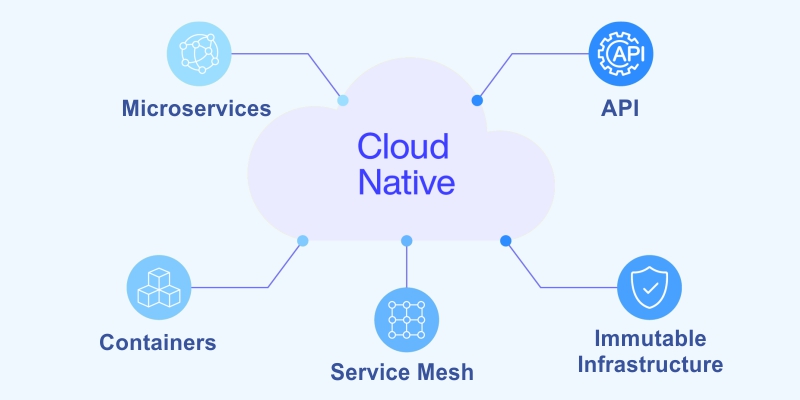
The folks at the Cloud Native Computing Foundation explain it well. Cloud-native technologies let you build and run scalable applications in modern dynamic environments like public clouds, private clouds, or hybrids. The big pieces are containers, microservices, immutable infrastructure, and declarative APIs.
Put those together, and you get systems that are loosely connected, can bounce back fast, stay easy to manage, and give you clear visibility. Throw in lots of automation, and suddenly changing code feels low-risk and almost routine.
It's not really about picking one specific set of tools. It's a different way of thinking about how software should live and grow.
The Main Building Blocks We Have Seen Work Every Time
Microservices come first. Take that giant single app and split it into small, er, focused pieces. Each one owns one clear responsibility. They communicate over well-defined APIs. If one part has a problem, the others don't automatically fall over. Different teams can work on different services at the same time without stepping on each other. Releases don't have to wait for the entire monolith to be ready.
Containers wrap it all up. Put your code, libraries, config, and everything needed to run into one consistent package. Docker made this practical. The same container runs on a developer's laptop, in a test environment, in staging, and in production. No more surprises because "the library version is different here."
Orchestration takes care of running hundreds or thousands of those containers. Kubernetes became the standard for good reason. It schedules them across machines, watches their health, restarts anything that dies, scales up when demand spikes, scales down when quiet, and routes traffic intelligently. Using managed Kubernetes services like Amazon EKS, Azure AKS, or Google GKE means you skip a ton of the hard operational work.
Immutable infrastructure changes the game. Stop logging into servers to patch or tweak things. Instead, build a new container image with the update baked in. Deploy the new image. Old instances get replaced. Nothing drifts over time. Everything is predictable.
Declarative configuration keeps things sane. You tell the system the desired end state. "Run three copies of this service with this image version." Kubernetes constantly works to make reality match that description. No long scripts of step-by-step commands that break if one thing goes wrong.
Observability has to be baked in from day one. In a distributed system, you can't just look at one log file. Capture logs, metrics, and distributed traces. Use Prometheus to collect metrics, Grafana to visualize them, and Jaeger or Zipkin for tracing calls across services. Without this, you find out something is broken only when customers start complaining.
Automation runs through everything. Treat infrastructure as code with Terraform or Pulumi. Set up CI/CD pipelines that build, test, scan, and deploy automatically on every push. GitOps tools like Argo CD or Flux keep cluster state matched to what's in git.
Design for stateless services whenever you can. Each request should be independent. Store persistent data in external databases, caches, and queues. That makes horizontal scaling trivial. For the parts that must hold state, lean on managed cloud services that handle replication and backups.
These pieces aren't optional add-ons. They're what turn chaotic deployments into something calm and repeatable.
The Real-World Wins Companies Actually Feel.
Scalability becomes almost automatic. Instead of vertically upgrading one big server, you add more small instances. Handle sudden traffic without planning months in advance. Pay only for what's running right now.
Release speed picks up dramatically. With automated pipelines, teams push small changes often. Fix a bug the same day it's found. Launch new features weekly instead of quarterly. In competitive spaces, that difference shows up in user growth and retention.
Resilience gets much stronger. Failures are isolated. Kubernetes restarts unhealthy pods automatically. Circuit breakers stop cascading failures. Multi-region deployments survive provider outages or even whole data center issues.
Operational costs usually trend down after the initial investment. No massive hardware purchases every few years. Better resource utilization. We've had clients report 30 to 50 percent lower ongoing ops spend once everything is settled.
Development teams move faster. Parallel work across services. Easier to try new languages or frameworks in one small area without touching the rest. Less coordination overhead.
Real examples stick with me. An e-commerce platform we helped use used to crash during big sales. After going cloud-native, it auto-scaled during Black Friday. No manual intervention.
Revenue kept climbing. A SaaS company went from monthly painful releases to daily deploys. Customers got fixes quickly. Complaints dropped sharply.
Practical Steps To Start Without Breaking Everything
Big bang migrations rarely go well. Start small and build momentum.
Audit what you have today. Which parts of the monolith are good candidates to extract first? Look for bounded contexts with clear boundaries. Pick one low-risk area or a new feature to build as a service.
Set up a solid foundation. Choose your cloud provider or go multi-cloud from the start. Spin up managed Kubernetes. Create a container registry. Get a basic CI/CD pipeline running with something like GitHub Actions or GitLab CI.
Containerize step by step. Write Dockerfiles for one service at a time. Keep images lean. Scan them for vulnerabilities during build.
Use the strangler fig approach for legacy code. Build new functionality as microservices. Gradually redirect traffic to them. Let the old monolith shrink naturally over months or years.
Automate the deployment path early. Code commit triggers tests, builds an image, pushes to the registry, and deploys to staging. Add manual gates at first, then automate more as confidence grows.
An instrument for visibility right away. Add logging libraries. Expose Prometheus metrics. Set up basic dashboards. Make sure alerts reach the right people quickly.
Deal with data thoughtfully. Prefer managed databases over self-hosted ones. Use event-driven patterns for loose coupling between services. Avoid tight synchronous calls where possible.
Make security non-negotiable. Scan containers. Use Kubernetes RBAC. Apply network policies. Consider a service mesh like Istio later for advanced traffic control.
Invest in people. Run short hands-on sessions on containers and Kubernetes. Pair developers with ops folks. Encourage blameless retrospectives after incidents.
We started with one client by containerizing a single reporting service. Three months later, they had four services running. Six months in, half the platform was cloud-native. Deploy frequency went from monthly to weekly. Incidents became rare.
Common Pitfalls That Slow Things Down
Distributed systems bring new kinds of complexity. More services mean more network calls, more failure modes. Counter it with solid API contracts and comprehensive observability.
Data consistency across services is tricky. Strongly consistent transactions are hard at scale. Embrace eventual consistency.
Use sagas or compensating actions for business workflows.
Team skills don't appear overnight. Kubernetes has a learning curve. Budget time and resources for training or external help early.
Cloud bills can shock you. Autoscaling misconfigured or forgotten test environments run up costs. Use resource quotas, cost allocation tags, and spend alerts.
Security posture matters more than ever. One compromised service can affect others. Follow least-privilege principles. Run regular vulnerability scans.
Where It All Lands
Cloud-native architecture isn't something you install. It's a commitment to building software that embraces change, failure, and scale as normal parts of life.
In 2026, most forward-looking applications follow these patterns. Traditional monoliths still have their place for simple, stable workloads. But once complexity or growth kicks iinn they start showing their age fast.
If your current setup means long release cycles, manual scaling, or frequent firefighting, cloud-native principles usually point the way out.
Not sure where to begin with your own applications? At TMITS, we start by looking at what you have today. We map realistic steps. We implement in phases. No forced overhaul.
Reach out at TMITS. We can have a straightforward conversation about what makes sense for you.
FAQs
What does cloud-native actually mean?
It means building applications designed to run well in cloud environments using containers, microservices, automation, and orchestration so they scale easily, recover quickly, and update often with low risk.
Is Kubernetes required for cloud-native?
Not strictly required, but it's the most common way to orchestrate containers at scale. Managed Kubernetes (EKS, AKS, GKE) handles the hard parts and is what most teams use in practice.
What are the biggest benefits for businesses?
Faster feature releases, automatic scaling during traffic spikes, much higher resilience to failures, lower long-term costs through efficient resource use, and easier experimentation with new technology.
How do you start moving to cloud-native without huge risk?
Begin small: containerize one service, build a simple CI/CD pipeline, deploy to managed Kubernetes, and add basic monitoring. Use the strangler pattern to gradually replace parts of legacy monoliths.
Does cloud-native always save money?
Usually yes, over time, through better scaling, no big hardware buys, and reduced manual ops work. Early stages can cost more due to learning and tooling, so start incrementally to keep control of spend.